Rendering Background
Last updated:
The background (also called the backdrop or playfield) is the scrolling world behind the sprites — the bricks, pipes and sky in Super Mario Bros. By the end of this chapter it's on screen, in color, and moving as the game scrolls.
Three steps:
- Static dump — the SMB title screen, grayscale. A warm-up that gets pixels up fast and gives us a known-good image to check against.
- The rendering pipeline — draw it the way the console does, one pixel per dot, fetching tiles as the beam sweeps. This is the bulk of the chapter, and it's what makes the screen scroll. Still grayscale.
- Color — feed the palette in.
Color comes last because it's a leaf you bolt on at the end — steps 1 and 2 stay
in grayscale. We take for granted that the PPU's eight registers
($2000–$2007) already read and write correctly, so VRAM holds the right
nametable and the pattern tables
hold the right tiles.
Step 1 — Static dump
A nametable is a 32×30 grid of tile indices; a pattern table turns each index into an 8×8 tile of 2-bit pixels. That's a whole screen, so draw it the dumb way: at the end of a frame, walk the 960 tile bytes, decode each tile, blit it into a 256×240 framebuffer.
for row in 0..30:
    for col in 0..32:
        let tile = nametable[row * 32 + col]
        let pixels = decode_tile(bg_pattern_table, tile)
        blit(framebuffer, pixels, col * 8, row * 8)
show(framebuffer)
This is the milestone-1 blit, with a nametable as the
source instead of the raw pattern table. bg_pattern_table comes from PPUCTRL bit
4 ($0000 or $1000). Map the four pixel values to four grays — 0→white,
3→black:
3 3 3 3 3 3 3 3
1 1 1 1 1 1 1 3
2 2 2 2 2 2 2 3
2 1 2 1 2 1 1 3
2 2 1 2 1 1 1 3
2 1 2 1 2 1 1 3
2 2 1 2 1 1 1 3
2 1 2 1 2 1 1 3
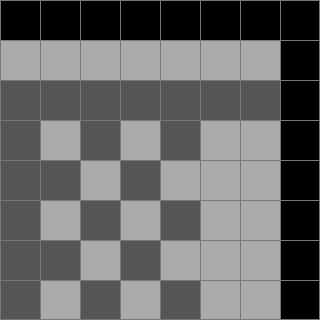
On the background, value 0 is not transparent the way it is for a sprite —
it's the backdrop color, the sky. For now it's just another gray; in step 3 it
becomes the universal background color.
Point this at Super Mario Bros. on its title screen and you should read "SUPER MARIO BROS." in gray — nametable 0 through pattern table 1. If it's garbled, stop: the problem is in the data or the decode, before any of the machinery below.
Step 2 — The rendering pipeline
The static dump can't scroll and isn't how the console works. The PPU draws one pixel per dot (one PPU clock; 341 per scanline) and never holds the whole nametable — it fetches a couple of bytes just ahead of the beam, clocks them out through shift registers, and walks the fetch address as it goes. That walk is the scroll: get it right and the screen moves for free.
Coarse and fine
Almost everything here is about naming a pixel, and the PPU splits that into two parts per axis: which tile, and which pixel inside the tile — the coarse and fine halves.
- coarse X / coarse Y — the tile's cell in the 32×30 nametable grid (X 0–31, Y 0–29).
- fine X / fine Y — the offset inside that tile, 0–7 each.
A pixel's position on each axis is coarse * 8 + fine. Scrolling by whole tiles
moves the coarse part; scrolling by a few pixels moves the fine part.
One asymmetry that explains a lot of the later code: fine Y lives inside v,
but fine X is its own register, x. Fine Y changes which bytes you fetch — a
tile's pattern is stored one byte per row, so the read address has to include it.
Fine X changes nothing about the fetch; it only picks which bit of an
already-fetched byte comes out. So fine Y rides in the address, while fine X is
held back and applied at the very end, as a pixel leaves the shift register.
The registers
The pipeline is short: VRAM → one latch per fetched byte → a shift register that
clocks a bit out per dot → a pixel. The address registers v/t/x are the
loopy registers from the PPU chapter; the latches and shift
registers are new here.
v  15b  current VRAM address — read pointer and scroll
t  15b  staging copy; PPUSCROLL writes it, copied into v
x   3b  fine-X; picks which bit of a tile is output

  fetch latch                shift register (1 bit/dot out)
  ─────────────────────      ──────────────────────────────
  nt_latch   tile index      (none; only addresses pattern)
  bg_lo_latch  plane 0    →  bg_pattern_lo  16b ┐ 2 tiles
  bg_hi_latch  plane 1    →  bg_pattern_hi  16b ┘ in flight
  at_latch   attr byte    →  bg_attr_lo      8b ┐ current
                             bg_attr_hi      8b ┘ tile
The attribute byte covers a 4×4-tile block. The 2 bits for this tile's quadrant
get parked in bg_attr_latch (2 bits) and fed into bg_attr_lo/hi one bit per
dot — more on that at the boundary below.
The scanline
Each visible scanline (0–239) spends its 341 dots like this:
dots 0       idle
dots 1-256   draw the 32 visible tiles (8 dots each)
dots 257-320 sprite fetches — background idle
dots 321-336 prefetch the next line's first 2 tiles
dots 337-340 dummy fetches
Sprites are a later chapter, so ignore 257–320 for now. The pre-render line (261) runs the same fetches but draws nothing, priming the registers for line 0.
The 8-dot tile cycle
A tile is 8 pixels wide, so it gets 8 dots, and two things run in parallel the
whole time. The shift registers clock pixels out — from a tile fetched
earlier — while four two-dot reads pull a later tile's bytes in. At dot 8 the
fetched tile drops into the registers and v steps one tile right.
The four reads. Every address comes from v, whose 15 bits are
yyy NN YYYYY XXXXX — fine-Y / nametable / coarse-Y / coarse-X:
nt_addr = 0x2000 | (v & 0x0FFF)
at_addr = 0x23C0 | (v & 0x0C00)
                | ((v >> 4) & 0x38) | ((v >> 2) & 0x07)
bg_addr = (bg_pattern_table << 12) | (nt_latch << 4) | ((v >> 12) & 7)
dots 1-2:  nt_latch    = ppu_read(nt_addr)
dots 3-4:  at_latch    = ppu_read(at_addr)
dots 5-6:  bg_lo_latch = ppu_read(bg_addr)
dots 7-8:  bg_hi_latch = ppu_read(bg_addr + 8)
bg_addr is the low bitplane, bg_addr + 8 the high
one — and both are built from nt_latch. That dependency fixes the order: you
can't address the pattern until the nametable read says which tile it is, so NT
comes first and the pattern bytes last. The attribute byte holds four quadrants'
palettes; coarse X/Y pick this tile's 2-bit one:
quad_shift = ((v >> 4) & 4) | (v & 2)
palette    = (at_latch >> quad_shift) & 3
Where the bytes go. The pattern registers are 16 bits and hold two tiles: the high byte is the tile being drawn, the low byte the next one, already fetched. Fine-X selects the output bit, which is how a scroll part-way into a tile works:
fine-X picks the output bit:  bit = (reg >> (15 - x)) & 1

  15 .......... 8   7 .......... 0    ◄ shift left 1/dot
  └ current tile ┘  └─ next tile ─┘
That two-tile lead is why dots 321–336 of the previous line had to prefetch: at dot 1 of this line the registers are already primed.
The boundary (dot 8). The four latches reload the registers' low bytes, and
the quadrant's palette bits go into bg_attr_latch:
bg_pattern_lo = (bg_pattern_lo & 0xFF00) | bg_lo_latch
bg_pattern_hi = (bg_pattern_hi & 0xFF00) | bg_hi_latch
bg_attr_latch = palette
Emit, every dot. On dots 1–256, read the top bit of each register for the
pixel, then shift them all left — the attr registers taking a fresh bit from
bg_attr_latch:
bit0 = (bg_pattern_lo >> (15 - x)) & 1
bit1 = (bg_pattern_hi >> (15 - x)) & 1
pal0 = (bg_attr_lo    >> (7 - x)) & 1
pal1 = (bg_attr_hi    >> (7 - x)) & 1
value   = (bit1 << 1) | bit0
palette = (pal1 << 1) | pal0
framebuffer[scanline][dot - 1] = gray[value]

bg_pattern_lo <<= 1
bg_pattern_hi <<= 1
bg_attr_lo = (bg_attr_lo << 1) | (bg_attr_latch & 1)
bg_attr_hi = (bg_attr_hi << 1) | (bg_attr_latch >> 1)
Grayscale ignores palette for now — step 3 reads it instead of throwing it
away. Here's a row coming out, real SMB pixels as fat blocks, the tile boundaries
every 8 dots:

And the same row with x = 3 — the bit selection starts three pixels into the
tile, so the whole row slides left, boundaries and all:

Scrolling — walking v
Nothing above moved the camera; v only has to advance correctly, and because
it's both the read pointer and the scroll position, that advance is the scroll.
Four updates, at fixed points in the line:
Every 8 dots — increment X. Step one tile right; at coarse X 31, wrap to 0 and flip the horizontal nametable bit so the walk continues into the next screen:
if (v & 0x001F) == 31:     # coarse X at the last column
    v &= ~0x001F           # wrap it to 0
    v ^= 0x0400            # flip horizontal nametable
else:
    v += 1
At dot 256 — increment Y. Step one pixel row down: bump fine Y, carry into coarse Y, flip the vertical nametable at row 29.
At dot 257, and again on the pre-render line — reload from t. By now v has
walked off to the right and down, so it's restored from t, the staging copy
PPUSCROLL writes — the horizontal bits every line, the vertical bits once per
frame:
dot 257:       v = (v & ~0x041F) | (t & 0x041F)   # X
dots 280-304:  v = (v & ~0x7BE0) | (t & 0x7BE0)   # Y, pre-render only
These reloads are the only path from the scroll the game wrote into v, so this
is where scrolling actually happens. Pin v = t = $2000, x = 0 and you get
step 1's title screen back exactly; let PPUSCROLL move them and SMB's overworld
scrolls as Mario walks, straddling two nametables (SMB uses vertical mirroring).
Still grayscale — the only thing that can be wrong here is the address math.
Step 3 — Color
Every pixel already arrives with a 4-bit index: palette (2 bits) and value (2
bits). Turn it into a palette-memory address:
let addr = 0x3F00 | (palette << 2) | value
$3F00–$3F1F is palette RAM (the palette table): eight 4-color palettes,
the low half for the background. Value 0 is the catch — every palette's entry 0
mirrors $3F00, the universal backdrop, the one color behind everything (the
sky). That's why background value 0 wasn't transparent in step 1:
if value == 0:
    addr = 0x3F00
let nes_color = palette_ram[addr & 0x1F] & 0x3F
That's a 6-bit number, 0–63: an index into the master palette (the system
palette), the 2C02's fixed 64-color RGB table. One more lookup and the grayscale
write from step 2 becomes a real pixel:
framebuffer[scanline][dot - 1] = MASTER_PALETTE[nes_color]
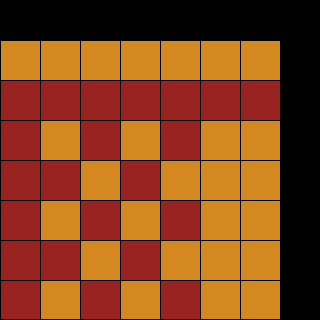
The result is blocky color regions: the palette comes from the attribute table, where every 2×2 tiles share one entry, so color is assigned in 16×16-pixel patches. Here's the step-1 tile in gray, then the same tile once its index runs through the two lookups:
What's left
The background is on screen, colored and scrolling. The remaining background details don't change the picture much:
- PPUMASK's grayscale bit (forces every color through
& 0x30) and the three emphasis bits that tint the output. - The leftmost-8-pixels clip, also in PPUMASK.
- The two dummy nametable fetches at dots 337–340, and the single dot skipped on odd frames when rendering is on.
The next thing that does change the picture is sprites, which ride on top of all this — and where the mid-frame scroll split (a fixed status bar over a moving level) finally gets driven, by sprite-0 hit.