Pattern tables
Last updated:
The majority of NES game graphics are stored in Tiles within structures called Pattern Tables (sometimes called the tile tables).
These tiles are similar to the spritesheets you'd find in a modern 2D game: a sheet of small images for game graphics.
- A single tile is 16 bytes
- A single pattern table is 4 KiB (ergo: there 256 tiles per pattern table)
These pattern tables are stored in the CHR-ROM memory of the cart, location of which is explained in the last part of previous chapter.
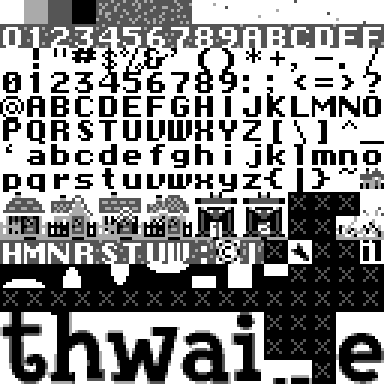
Next are displayed the pattern tables of the Thwaite game. Since:
- CHR-ROM in Thwaite is 8 KiB (shown in previous chapter),
- And every single pattern table is 4 KiB,
... there's two pattern tables in Thwaite:
Pattern table0 ($4010-$500F):
Pattern table1 ($5010-$600F):
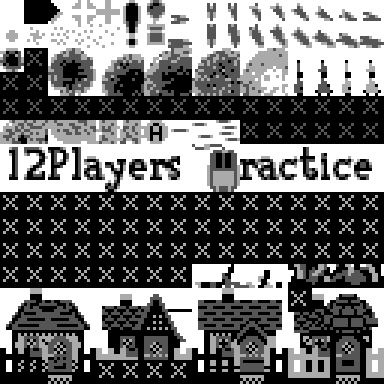
Keep in mind, each pattern table is displayed in a 16×16 tiles layout, left to right, top to bottom. But this is just to fit in the webpage width.
The tiles are actually stored as a "single strip", one after the other
Why is it in black and white?
Colors are not stored in pattern tables (why is explored at a later chapter).
Because of that, we rendered these in grayscale.
But even without the palette, we can discern the shapes: the font, the houses you defend, the missiles and explosion bursts, and the chunky title-screen letters spelling thwaite.
How is every tile represented in the data?
To teach how tiles are stored, I'll use the 1-tile little house
below the o and right to the ~ tiles from pattern table 0.
This is the house scaled up:

Notice how there's only 4 different grayscale tones, this will be important later.
We're gonna first obtain the 16 bytes of this tile and then we're going to convert them, somehow, into this image.
Getting the tile bytes address
To obtain those 16 bytes, we first need their address.
This tile is the tile 127 (0-based) counting left to right
(row 7, column 15 so 7*16 + 15 = 127).
And each tile takes 16 bytes, so 126*16=2032, in hex 0x7f0
Since the pattern table starts at 0x4010 + 0x7F0 = 0x4800
We can get the 16 bytes at 0x4800 with xxd:
> xxd -s 0x4800 -l 16 thwaite.nes
20 00 00 0a 7a fb ff 00 ┊ 24 2e ff f1 04 a5 a5 00
Rendering the image
The first 8 bytes of the tile are bitplane 0, and the latter 8 are bitplane 1. And we're going to show every byte in binary.
        bitplane 0 (low bit)         bitplane 1 (high bit)
row 0   $20  0 0 1 0 0 0 0 0      $24  0 0 1 0 0 1 0 0
row 1   $00  0 0 0 0 0 0 0 0      $2E  0 0 1 0 1 1 1 0
row 2   $00  0 0 0 0 0 0 0 0      $FF  1 1 1 1 1 1 1 1
row 3   $0A  0 0 0 0 1 0 1 0      $F1  1 1 1 1 0 0 0 1
row 4   $7A  0 1 1 1 1 0 1 0      $04  0 0 0 0 0 1 0 0
row 5   $FB  1 1 1 1 1 0 1 1      $A5  1 0 1 0 0 1 0 1
row 6   $FF  1 1 1 1 1 1 1 1      $A5  1 0 1 0 0 1 0 1
row 7   $00  0 0 0 0 0 0 0 0      $00  0 0 0 0 0 0 0 0
Now, merge both planes into a new grid. For each pixel, stack its high bit (plane 1) over its low bit (plane 0) to get a 2-bit number:
merged (high bit, low bit)
row 0   00 00 11 00 00 10 00 00
row 1   00 00 10 00 10 10 10 00
row 2   10 10 10 10 10 10 10 10
row 3   10 10 10 10 01 00 01 10
row 4   00 01 01 01 01 10 01 00
row 5   11 01 11 01 01 10 01 11
row 6   11 01 11 01 01 11 01 11
row 7   00 00 00 00 00 00 00 00
Now read each 2-bit number as a value 0–3:
0is transparent (shown as.to make the shape easier to see)1is light gray2is dark gray3is black
. . 3 . . 2 . .
. . 2 . 2 2 2 .
2 2 2 2 2 2 2 2
2 2 2 2 1 . 1 2
. 1 1 1 1 2 1 .
3 1 3 1 1 2 1 3
3 1 3 1 1 3 1 3
. . . . . . . .
Hopefully, via intuition, you'll see how every number matches the tile. And that's how the tiles are rendered from data.
But where's the color?
Color is determined from a selected palette, which is determined at runtime. We're gonna see that way later.